Showing posts with label AX. Show all posts

Tuesday, 8 August 2017

Difference between view and table

Difference between a view and a base relation: -

Views:
1. This is one type of relation which is not a part of the physical
database.
2. It has no direct or physical relation with the database.
3. Views can be used to provide security mechanism.
4. Modification through a view (e.g. insert, update, delete) generally
not permitted

Base Relation:
1. A base relation is a relation that is not a derived relation.
2. While it can manipulate the conceptual or physical relations stored
in the data.
3. It does not provide security.
4. Modification may be done with a base relation.
We can assign the view, a name & relate it the query expression as
Create View <View Name> as <Query Expression>
Let EMPLOYEE be the relation. We create the table EMPLOYEE as follows:-

Create table EMPLOYEE
(Emp_No integer of null,
Name char (20),
Skill chars (20),
Sal_Rate decimal (10, 2),
DOB date,
Address char (100),)
For a very personal or confidential matter, every user is not
permitted to see the Sal_Rate of an EMPLOYEE. For such users, DBA can
create a view, for example, EMP_VIEW defined as:-

Create view EMP_VIEW as
(Select Emp_No, Name, Skill, DOB, Address
         From EMPLOYEE)

refresh, reread, research, executeQuery - which one to use?

X++ developers seem to be having a lot of trouble with these 4 datasource methods, no matter how senior they are in AX.

1. Common mistakes
Often, developers call 2 of the mentioned methods in the following order:

formDataSource.refresh()
formDataSource.research()

or

formDataSource.reread()
formDataSource.research()

or

formDataSource.research()
formDataSource.executeQuery()

or

formDataSource.research()
formDataSource.refresh() / formDataSource.reread()

All of these are wrong, or at least partially redundant.
Hopefully, after reading the full post, there will be no questions as to why they are wrong. Leave a comment to this post if one of them is still unclear, and I will try to explain in more detail.


2. Refresh
This method basically refreshes the data displayed in the form controls with whatever is stored in the form cache for that particular datasource record. Calling refresh() method will NOT reread the record from the database. So if changes happened to the record in another process, these will not be shown after executing refresh().


refreshEx
Does a redraw of the grid rows, depending on the optional argment for specifying the number of the record to refresh (and this means the actual row number in the grid, which is less useful for AX devs). Special argument values include -1, which means that all records will be redrawn, and -2, which redraws all marked records and records with displayOptions. Default argument value is -2.
This method should be used sparingly, in cases where multiple rows from the grid are updated, resulting in changes in their displayOptions, as an example. So you should avoid using it as a replacement for refresh(), since they actually have completely different implementations in the kernel.
Also, note, that refreshEx() only redraws the grid, so the controls not in the grid might still contain outdated values. Refresh() updates everything, since this is its intention.


3. Reread
Calling reread() will query the database and re-read the current record contents into the datasource form cache. This will not display the changes on the form until a redraw of the grid contents happens (for example, when you navigate away from the row or re-open the form).
You should not use it to refresh the form data if you have through code added or removed records. For this, you would use a different method described below.


How are these 2 methods commonly used?
Usually, when you change some values in the current record through some code (for example, when the user clicks on a button), and update the database by calling update method on the table buffer, you would want to show the user the changes that happened.
In this case, you would call reread() method to update the datasource form cache with the values from the database (this will not update the screen), and then call refresh() to actually redraw the grid and show the changes to the user.


Clicking buttons with SaveRecord == Yes
Each button has a property SaveRecord, which is by default set to Yes. Whenever you click a button, the changes you have done in the current record are saved to the database. So calling reread will not restore the original record values, as some expect. If that is the user expectation, you as a developer should set the property to No.


4. Research
Calling research() will rerun the existing form query against the database, therefore updating the list with new/removed records as well as updating all existing rows. This will honor any existing filters and sorting on the form, that were set by the user.


Research(true)
The research method starting with AX 2009 accepts an optional boolean argument _retainPosition. If you call research(true), the cursor position in the grid will be preserved after the data has been refreshed. This is an extremely useful addition, which solves most of the problems with cursor positioning (findRecord method is the alternative, but this method is very slow).


5. ExecuteQuery
Calling executeQuery() will also rerun the query and update/add/delete the rows in the grid. The difference in behavior from research is described below.
ExecuteQuery should be used if you have modified the query in your code and need to refresh the form to display the data based on the updated query.


formDataSource.queryRun().query() vs formDataSource.query()
An important thing to mention here is that the form has 2 instances of the query object - one is the original datasource query (stored in formDataSource.query()), and the other is the currently used query with any user filters applied (stored in formDataSource.queryRun().query()).
When the research method is called, a new instance of the queryRun is created, using the formDataSource.queryRun().query() as the basis. Therefore, if the user has set up some filters on the displayed data, those will be preserved.
This is useful, for example, when multiple users work with a certain form, each user has his own filters set up for displaying only relevant data, and rows get inserted into the underlying table externally (for example, through AIF).
Calling executeQuery, on the other hand, will use the original query as the basis, therefore removing any user filters.
This is a distinction that everyone should understand when using research/executeQuery methods in order to prevent possible collisions with the user filters when updating the query.

Using UI Builder Class to Develop SSRS Reports in Microsoft Dynamics AX 2012

UI Builder Class Overview

User Interface (UI) Builder Class is used to define the layout of the parameter dialog box that opens before a report is run in Microsoft Dynamics AX. It is used to add the customizations as well as additional fields in the dialog.
Following are the scenarios where UI Builder Class can be used:
  1. Grouping dialog fields
  2. Overriding dialog field events
  3. Adding a customized lookup to a dialog field
  4. Binding dialog fields with Report contract parameters
  5. Changing the layout of the dialog
  6. Adding custom controls to the dialog
To create a UI builder class, extend it with SrsReportDataContractUIBuilder.

Pre-requisites

  1. Microsoft Dynamics AX 2012
  2. Reporting services extensions must be installed in Dynamics AX
  3. Report contract class

Sample UI Builder Class

  1. Create a new class. Open AOT à Classes
  2. Right Click on Classes and select New Class. Name it as SSRSDemoUIBuilder
  3. UI builder class example in microsoft dynamics ax 2012
  4. Open the Class declaration by right clicking on it and selecting View code
  5. UI builder class example in microsoft dynamics ax 2012
  6. Write the following code
  7. public class SSRSDemoUIBuilder extends SrsReportDataContractUIBuilder
    {
    
    }
  8. Now open the contract class and add the following line to the header of the class. It will tell the contract class to build the parameter dialog. In other words, it will link the UI Builder Class with the contract class.
SysOperationContractProcessingAttribute(classStr(SSRSDemoUIBuilder))

Examples of UI Builder Class Usage

Based on different scenarios, different methods are overridden as shown in the following examples:
  1. Grouping the dialog fields/Changing the layout of the dialog/Adding custom controls to the dialog
    • To customize the layout and add custom fields, override the build as shown below:
    • public void build()
      {
          DialogGroup dlgGrp;    
      
          //get the current dialog
          Dialog      dlg = this.dialog();       
      
          //make required modifications to the dialog
          dlgGrp = dlg.addGroup('Dates');  
          dlgGrp.columns(2);   
          dlg.addField(identifierStr(FromDate));
          dlg.addField(identifierStr(ToDate));    
              
          dlgGrp = dlg.addGroup('Customer');  
          dlg.addField(identifierStr(CustAccount));    
      }
      
    • ThIS build method is called by the report framework to generate the layout of the dialog.
  2. Binding dialog fields with Report contract parameters
    • Write the following code in the build method:
    //get the report data contract object
    contract = this.dataContractObject();
        
    //associate dialog field with data contract method
    this.addDialogField(methodStr(SSRSDemoContract,parmCustGroupId), contract);
  3. Overriding dialog field events/Adding a customized lookup to a dialog field
  • To add a customized lookup or to override a control method, create a new method containing the business logic. The new method must have the same signature as the method you want to override.
  • Then, override the postBuild method and register the method to override with the new method created.
  • In the following example, the lookup method of a field is to be overridden. To do this, create a new method lookupCustGroup and add the following code:
  • public void lookupCustGroup(FormStringControl _formStringControl)
    {    
        Query query = new Query();
        QueryBuildDataSource DS;    
        SysTableLookup sysTablelookup;
    
        //create a table lookup    
        sysTablelookup = SysTableLookup::newParameters(tableNum(CustGroup),_formStringControl);
        sysTablelookup.addLookupfield(fieldNum(CustGroup,CustGroup));
        sysTablelookup.addLookupfield(fieldNum(CustGroup,Name));
    
        //create a query
        DS = query.addDataSource(tableNum(CustGroup));
        DS.addRange(fieldNum(CustGroup,PaymTermId)).value('N030');
    
        //assign the query and call lookup
        sysTablelookup.parmQuery(query);
        sysTablelookup.performFormLookup();
    }
  • Now, override the postBuild method and write the following code:
  • public void postBuild()
    {
        DialogField dlgCustGroup;
        
        super();
        
        //get the field to override by providing the data contract object and the associated attribute/method
        dlgCustGroup = this.bindInfo().getDialogField(this.dataContractObject(),
                    methodStr(SSRSDemoContract,parmCustGroupId));
    
        //register the method we want to override
        dlgCustGroup.registerOverrideMethod(
              methodStr(FormStringControl, lookup),
              methodStr(SSRSDemoUIBuilder,lookupCustGroup),
              this);    
    }
    
  • bindInfo returns an object of type SysOperationUIBindInfo. It contains information about the dialog controls bounded to a report contract.
  • postBuild method is called when dialog is created.

Vendors Merge In Microsoft Dynamics AX 2012

static void vendorsMerge(Args _args)
{
    VendTable                                   vendTable;
    VendTable                                   vendTableDelete;
    PurchJournalAutoSummary                     journalSummary;
    RetailVendTable                             retailVendTable;

    DimensionAttributeValue                     dimensionAttributeValue;
    DimensionAttributeLevelValue                dimensionAttributeLevelValue;
    DimensionAttributeValueGroup                dimensionAttributeValueGroup;
    DimensionAttributeValueCombination          dimensionAttributeValueCombination;
    DimensionAttributeValueGroupCombination     dimensionAttributeValueGroupCombination;

    #define.vend('1003')
    #define.vendDelete('US_TX_003')

    ttsbegin;
    delete_from journalSummary
        where journalSummary.VendAccount ==  #vendDelete;
    delete_from retailVendTable
        where retailVendTable.AccountNum == #vend;

    select firstonly forupdate vendTableDelete
        where vendTableDelete.AccountNum == #vendDelete;

    select firstonly forupdate vendTable
        where vendTable.AccountNum == #vend;

    select firstonly forupdate dimensionAttributeValueGroup
        join dimensionAttributeLevelValue
            where dimensionAttributeValueGroup.RecId == dimensionAttributeLevelValue.DimensionAttributeValueGroup
               && dimensionAttributeLevelValue.DisplayValue == #vendDelete;
    dimensionAttributeValueGroup.delete();

    select firstonly forupdate dimensionAttributeValue
        join dimensionAttributeLevelValue
            where dimensionAttributeValue.RecId == dimensionAttributeLevelValue.dimensionAttributeValue
               && dimensionAttributeLevelValue.DisplayValue == #vendDelete;
    dimensionAttributeValue.delete();

    select firstonly forupdate dimensionAttributeLevelValue
        where dimensionAttributeLevelValue.DisplayValue == #vendDelete;
    dimensionAttributeLevelValue.delete();

    select firstonly forupdate dimensionAttributeValueGroupCombination
        join dimensionAttributeValueCombination
            where dimensionAttributeValueCombination.RecId == dimensionAttributeValueGroupCombination.DimensionAttributeValueCombination
               && dimensionAttributeValueCombination.DisplayValue == #vendDelete;
    dimensionAttributeValueGroupCombination.delete();

    select firstonly forupdate dimensionAttributeValueCombination
        where dimensionAttributeValueCombination.DisplayValue == #vendDelete;
    dimensionAttributeValueCombination.delete();

    vendTableDelete.merge(vendTable);
    vendTable.doUpdate();
    vendTableDelete.doDelete();
    ttscommit;
    info("Vendor merging successfull");
}

Create Custom Number sequence in Dynamics 365 for operations

In AX2012 or AX 2009 we directly write code on existing number sequence class​​ but in AX (7) new version need to create new class and required extend to NumberSeqApplicationModule and required delegate method for mapping.

1. Create EDT ChangeId.
2. Add EDT to Table ChangeLog.
3. Create new Table method numRefChangeId().
public class ChangeLog extends common
{
   static NumberSequenceReference numRefChangeId()
    {
        return NumberSeqReference::findReference(extendedTypeNum(ChangeId));
    }
}
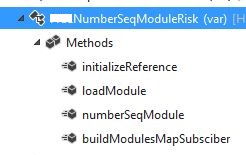
​4. Create New Class NumberSeqModuleRisk and extend NumberSeqApplicationModule​ and a delegate method.
Picture
lass NumberSeqModuleRisk extends NumberSeqApplicationModule
{
    public void initializeReference(NumberSequenceReference _reference,
         NumberSeqDatatype _datatype, NumberSeqScope _scope)
    {
        #ISOCountryRegionCodes
        super(_reference, _datatype, _scope);

        switch (_datatype.parmDatatypeId())
        {
            case extendedTypeNum(ChangeId):
         
                if("USA")
                {
                    _reference.AllowSameAs = true;
                }
               /*if (SysCountryRegionCode::isLegalEntityInCountryRegion([#isoIT]))
               {
                   _reference.AllowSameAs = true;
               }*/
        }
    }

    protected void loadModule()
    {
        NumberSeqDatatype datatype = NumberSeqDatatype::construct();

        datatype.parmDatatypeId(extendedTypeNum(ChangeId));
        datatype.parmReferenceHelp(literalStr("Creating new ChangeId"));
        datatype.parmWizardIsManual(NoYes::No);
        datatype.parmWizardIsChangeDownAllowed(NoYes::No);
        datatype.parmWizardIsChangeUpAllowed(NoYes::No);
        datatype.parmWizardHighest(999999);
        datatype.parmSortField(1);

        datatype.addParameterType(NumberSeqParameterType::DataArea, true, false);
        this.create(datatype);   

    }

    public NumberSeqModule numberSeqModule()
    {
        return NumberSeqModule::Proj;
    }

    [SubscribesTo(classstr(NumberSeqGlobal),delegatestr(NumberSeqGlobal,buildModulesMapDelegate))]
    static void buildModulesMapSubsciber(Map numberSeqModuleNamesMap)
    {
        NumberSeqGlobal::addModuleToMap(classnum(NumberSeqModuleRisk), numberSeqModuleNamesMap);
    }
}

5. Write a job and run that
static void ChangeId(Args _args)
{
    NumberSeqModuleRisk numberSeqModuleRisk = new NumberSeqModuleRisk ();
    numberSeqModuleRisk .load();
}
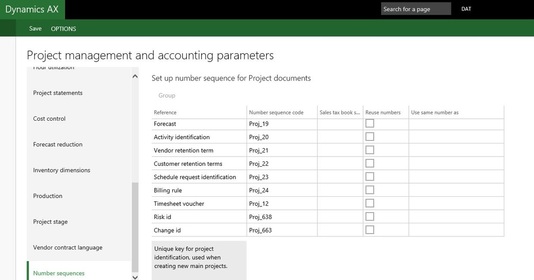
6. Then run the wizard   Organization Administration -> CommonForms -> Numbersequences -> Numbersequences -> Generate -> run the wizard.

GO to Project management module -> setup -> Project management parameters form -> Num Seq
Picture
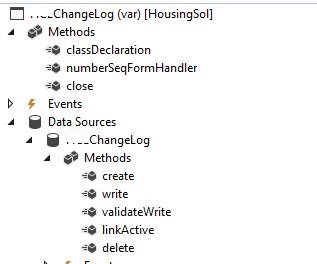
​7. Now create methods as shown on Form below.
Picture
[Form]
public class ChangeLog extends FormRun
{
    NumberSeqFormHandler numberSeqFormHandler;
    /// <summary>
    ///
    /// </summary>
    NumberSeqFormHandler numberSeqFormHandler()
    {
        if (!numberSeqFormHandler)
        {
numberSeqFormHandler=NumberSeqFormHandler::newForm(ChangeLog::numRefChangeId().NumberSequenceId,  element, ChangeLog_DS,   fieldNum(ChangeLog, ChangeId));
        }
        return numberSeqFormHandler;
    }
    public void close()
    {
        if (numberSeqFormHandler)
        {
            numberSeqFormHandler.formMethodClose();
        }
        super();
    }

    [DataSource]
    class ChangeLog
    {
        public void create(boolean _append = false,
                           boolean _extern = false)
        {
            element.numberSeqFormHandler().formMethodDataSourceCreatePre();

            super(_append);
            if (!_extern)
            {
                element.numberSeqFormHandler().formMethodDataSourceCreate(true);
            }

        public void write()
        {
            super();
            element.numberSeqFormHandler().formMethodDataSourceWrite();
        }
        public boolean validateWrite()
        {
            boolean         ret;
            ret = super();
            ret = element.numberSeqFormHandler().formMethodDataSourceValidateWrite(ret) && ret;
            if (ret)
            {
                ChangeLog.validateWrite();
            }
            return ret;
        }
        public void linkActive()
        {
            element.numberSeqFormHandler().formMethodDataSourceLinkActive();
            super();
        }

        public void delete()
        {
            element.numberSeqFormHandler().formMethodDataSourceDelete();
            super();
        }
    }
}

Now our custom number sequence is generated. Open your Form and check Num Seq by creating new record on your filed.

​ Reference: https://community.dynamics.com/ax/b/daxseed/archive/2016/11/17/ax-7-custom-number-sequence

Exporting Data to an Excel Using X++ in Dynamics 365 for Operations

 Here In D365 we don't have SysExcelApplication, we can use OfficeOpenXml Namespace to do this.  

    using System.IO;
    using OfficeOpenXml;
    using OfficeOpenXml.Style;
    using OfficeOpenXml.Table;
    class CustExport
    {
             public static void main(Args   _args)
        {
       
            CustTable custTable;
            MemoryStream memoryStream = new MemoryStream();

            using (var package = new ExcelPackage(memoryStream))
            {
                var currentRow = 1;

                var worksheets = package.get_Workbook().get_Worksheets();
                var CustTableWorksheet = worksheets.Add("Export");
                var cells = CustTableWorksheet.get_Cells();
                OfficeOpenXml.ExcelRange cell = cells.get_Item(currentRow, 1);
                System.String value = "Account Number";
                cell.set_Value(value);
                cell = null;
                value = "Currency";
                cell = cells.get_Item(currentRow, 2);
                cell.set_Value(value);

                while select CustTable
                {
                    currentRow ++;
                    cell = null;

                    cell = cells.get_Item(currentRow, 1);
                    cell.set_Value(CustTable.AccountNum);
                    cell = null;

                    cell = cells.get_Item(currentRow, 2);
                    cell.set_Value(CustTable.Currency);
                }
                package.Save();
                file::SendFileToUser(memoryStream, "Test");
          
            }
      
        }

}

Display method in Dynamics 365 for operations

Hi All,
This posts helps you to understand and create a "display"  method for the table extension.
Lets say, the requirement is to add a method in the standard table, it can be achieved either by creating a table extension.
So in this scenario we had a requirement to add a display method in the standard table "CustTrans".
In Dynamics 365 we wont be able to add the new method or modify the existing method to the standard table or to an extension table.
It can be achieved by using the extension class.
Step 1: Create a new class and name it as <Classname>_<Extension>.
<Class-name> - can be any name, but it is preferred to give the table name for which the extension is being created. 
postfix <_Extension> is must.
public static class CustTrans_Extension
{
}
Step 2 : Now add the display methods in the class which is required to be shown.
public static class CustTrans_Extension
{
[SysClientCacheDataMethodAttribute(true)]
public static display AgreementId agreementId(CustTrans _this)
{
LedgerJournalTrans ledgerJournalTrans;
select ledgerJournalTrans
where ledgerJournalTrans.TransactionType == LedgerTransType::Payment &&
LedgerJournalTrans.CustTransId == _this.RecId;

return ledgerJournalTrans.AgreementId;
}
}
Step 3: To use this display method in the form.
Create a string control in the form design and set the following properties
Data source: CustTrans
DataMethod: CustTrans_Extension::agreementId
CacheDataMethod: Yes
Below is the screen shot for reference.
Step 4: Build/Rebuild the project/solution and check the output in the URL.